

PlayinMatch99 › PlayinMatch APK
APK FILEPlayinMatch APK — The Latest Verified Android File and Its Install Order
One file, roughly 28 MB, and that file is the entire app. The PlayinMatch apk has no store listing behind it, no update badge waiting in a queue, nobody reviewing a submission before your build is allowed to change. You allow the install once. After that PlayinMatch99 opens on the username and the balance you already use in a browser tab.
This page is about the file itself: which build you are holding, how heavy it is on storage, what it asks permission for, why an install gets blocked, and what happens to a signed-in PlayinMatch99 ID when a newer package lands on top of an older one. If you want the walk from link to first screen instead, the PlayinMatch app download page covers that end of it.
The PlayinMatch APK Explained — One Verified 28 MB Android File
Android's store does not carry real-money exchange apps, so PlayinMatch99 hands the package out directly. One file. You keep it, you install it, and nothing sits between the desk and your phone.
What you are downloading is an ordinary Android application package — the same container format every Android app ships in, store or no store. The PlayinMatch apk weighs about 28 MB, which is light for 2026, and the reason is that almost nothing is baked inside. Table art, odds, the in-play scorecard, casino thumbnails, the Aviator round history: all of it streams in when you open a room. The file carries the shell — login console, lobby frame, deposit and withdrawal screens, and the bridge that keeps cricket prices ticking over.
Which is why the app is not a different product from the site. Same PlayinMatch99 ID, same wallet, same open bets. Close a session in Chrome at the end of an over, open the installed build fifteen minutes later, and your slips are sitting where you left them, because they were never stored on the the handset in the first place.
Three things the PlayinMatch apk is not
It is not a lite version — the installed build reaches every room the browser reaches, including slots and the live studios. It is not an iPhone file; iOS has no PlayinMatch99 package at all, and iPhone users add the mobile site to the home screen instead. And it is not a one-time download that lasts forever, because the desk replaces the build a few times a year.
Latest PlayinMatch APK Version Spec — Build, Size, Android Minimum and Permissions
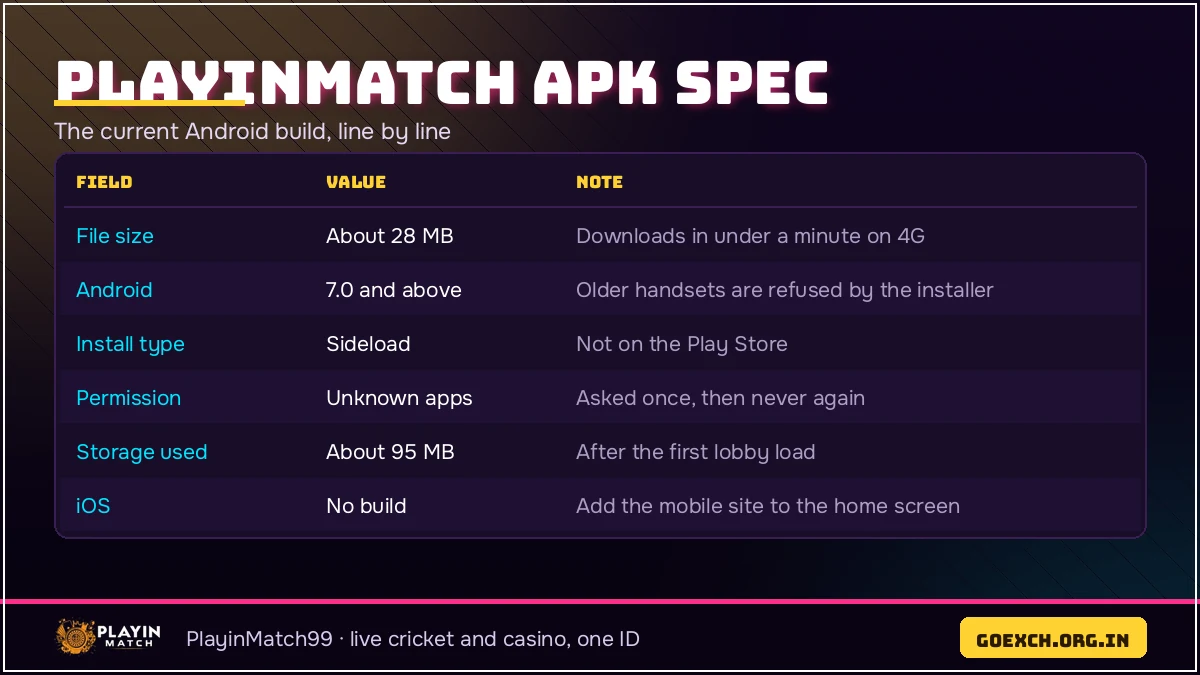
Here is the spec sheet for the build currently going out from the PlayinMatch99 desk. Numbers move a little between releases — the size in particular drifts by a megabyte or two — so treat this as the shape of the file rather than a figure carved in stone.
| Build label | 2026.09, shown inside the app under the PlayinMatch99 account screen |
|---|---|
| Download size | About 28 MB over mobile data or Wi-Fi |
| Installed size | Roughly 70 MB after the first lobby load |
| Android minimum | Android 7.0 and above; anything from 2017 onward runs it |
| Permissions asked | Install unknown apps (once), notifications (optional), storage for saved statements |
| What changed | Faster in-play scorecard beside the cricket market, UPI deposit screen from ₹100 on one tap, Aviator round history loads without a refresh |
| iOS build | None. iPhone runs the PlayinMatch99 mobile site from the home screen |
The line that matters most on that sheet is the size. A genuine PlayinMatch apk lands between 27 and 29 MB. If a file claiming to be the PlayinMatch99 build comes in at 6 MB, it is a shortcut wrapper someone repackaged; if it comes in at 90 MB, it is carrying something the exchange never put there. Check the number before you tap install, not after.
Android 7.0 as the floor is deliberate. It keeps the package small and lets PlayinMatch99 run on the cheap handsets that actually show up in the support logs from tier-two cities — older Redmi and Realme phones with 2 GB of RAM handle the lobby fine, though the live casino tables take a beat longer to draw.
How Much Free Storage the PlayinMatch APK Really Needs — Quick Numbers
A phone with 40 MB free will refuse a 28 MB file, which sounds like nonsense until you count what Android is doing. It keeps the downloaded package. It writes an unpacked copy beside it. Then the PlayinMatch99 lobby builds its working data on first launch. Three helpings of space, one after another, and only the first one is 28 MB.
- 28 MB — the PlayinMatch apk sitting in your Downloads folder. It stays there after the install until you delete it, so that is 28 MB you can reclaim later.
- About 70 MB — the installed PlayinMatch99 app once the lobby, the exchange tabs and the casino category thumbnails have loaded once.
- 150 MB free — the comfortable headroom to start with. Below roughly 120 MB the install starts throwing errors that look like file problems but are storage problems.
- Grows slowly — session data adds a few megabytes over a busy IPL fortnight. Emptying it from the Android app info screen is harmless; your PlayinMatch99 ID and balance are untouched by it.
SD-card installs are worth a mention. Some handsets offer to move apps across, and PlayinMatch99 runs from external storage without complaint, but launches take longer and in-play odds can hesitate on a slow card. Keep it on internal storage if the phone has the space.
Install Blocked? The Fast Fix for the PlayinMatch APK on Any Android
This is the single most common message that reaches the PlayinMatch99 desk about the file, and it is not a fault. Android refuses, by default, to install anything that did not arrive from its own store. The permission is per-app, which trips people up: allowing it once for Chrome does nothing if you later open the PlayinMatch apk from the Files app instead.
- "For your security, your phone is not allowed to install unknown apps" — the dialog carries a Settings shortcut inside it. Tap that, turn the permission on for whichever app is holding the file, press back, tap the PlayinMatch apk once more. Fifteen seconds, and Android asks only that first time.
- "App not installed" — an older PlayinMatch99 build is already on the phone and its signature does not match the new one. Remove the old app from the home screen, then install the new file. Your ID is unaffected.
- "There was a problem parsing the package" — the download stopped partway, or the phone is below Android 7.0. Delete the half-file and fetch it again on a stable connection.
- Play Protect asks to scan — let it, or choose install anyway. It flags sideloaded packages by category, not because it found something wrong with the PlayinMatch99 build.
- Install button greyed out — storage. Free up 150 MB and the same file installs on the first try.
A composite from the desk log, because it is the pattern rather then the person that matters: a user in Nagpur messaged at 10:40 pm during an IPL second innings, install blocked twice, convinced the PlayinMatch apk was broken. He had allowed unknown apps for Chrome. The file was in his Files app. Two taps in Settings and the build was running before the strategic timeout finished.
PlayinMatch APK Old Version — Why the Latest File Stays Safer
People search for the old version for two reasons: an install failed and they think a lighter build will behave, or the new layout moved something they had memorised. Both are understandable. Neither ends well on an exchange.
An old PlayinMatch apk keeps working up to a point. It opens, it logs in, your balance shows correctly, because all of that comes from the server. What ages is the screen. When PlayinMatch99 adds a studio, renames a market group or changes how the deposit screen hands off to UPI, the old build carries on drawing the old version of that screen, and the mismatch shows up at exactly the wrong moment — a cash-out button that does not respond during an Aviator round, or a session market that never refreshes its price.
| Build | Size | Main change |
|---|---|---|
| 2026.09 (current) | 28 MB | In-play scorecard beside the market, one-tap UPI deposit from ₹100 |
| 2026.07 | 27 MB | Aviator auto cash-out and double bet on the same screen |
| 2026.04 | 26 MB | Live casino rooms split by studio, Evolution and Ezugi listed separately |
The other problem with hunting an old file is where it comes from. Old builds are not kept on the PlayinMatch99 side, so anything you find is on a third-party mirror, repacked by someone you cannot ask a question. The desk will not support a build it did not issue — not because of policy theatre, but because it genuinely cannot tell what is inside a stranger's package. If the current PlayinMatch apk is misbehaving, message the 24x7 desk and describe the screen; a reply usually comes back inside a couple of minutes.
Updating the PlayinMatch APK Without Losing Your Verified PlayinMatch99 ID
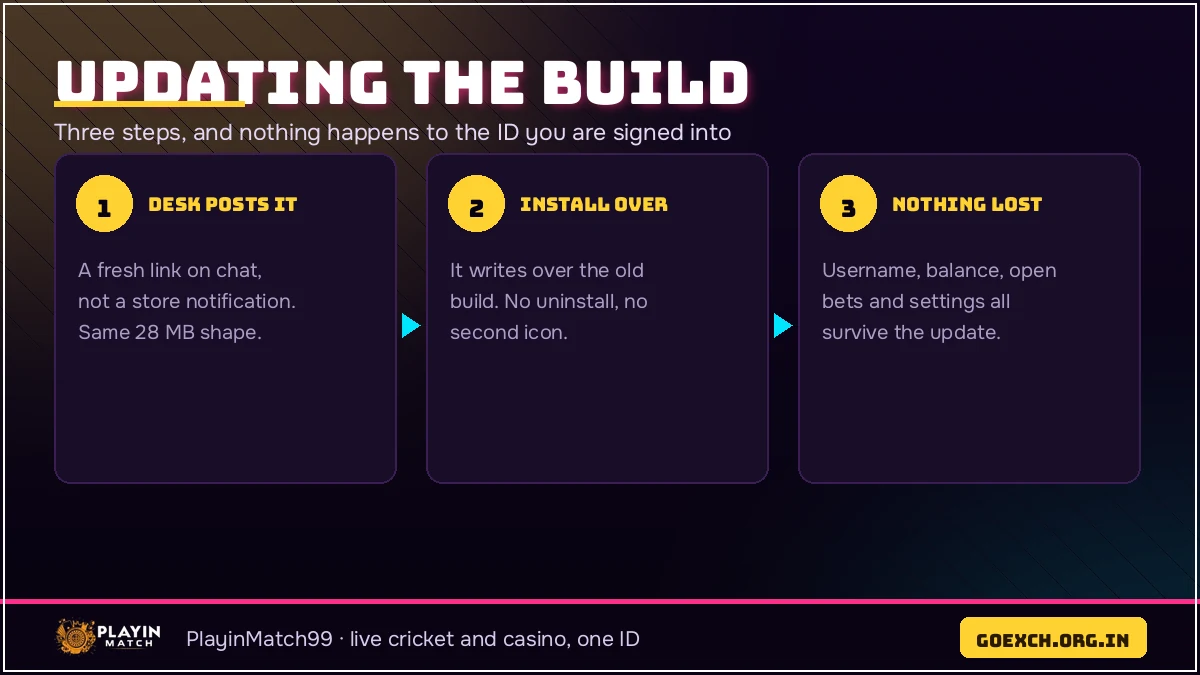
Short answer: nothing happens to the ID. That bears repeating, because fear of losing an account is exactly what keeps people sitting on an April build.
Your PlayinMatch99 username, password, wallet balance, open bets, bet history and withdrawal records all live on the server. The installed file holds none of it. Put the new package over the old one, and Android replaces the app while leaving its data folder in place — you open it, and the account is exactly where it was, including a bet you placed twenty minutes earlier from a browser.
Two small things do change hands. The signed-in session sometimes clears, so the PlayinMatch99 console asks for the username and password once; if you had Keep me signed in ticked, it usually survives. And notification settings occasionally reset to default, which matters if you had switched off match alerts.
If you uninstall before installing
Removing the old PlayinMatch99 app first is fine and sometimes necessary, but it wipes the local session for certain, so keep the password handy. Forgotten it? The Reset tab on the console takes the registered mobile number to the desk and a new password comes back from the PlayinMatch99 desk over chat, usually in a minute or two. Nothing about your balance or KYC status is affected by a reinstall — its stored against the ID, not the phone.
Inside the PlayinMatch APK — the Live Cricket and Casino Lobby It Opens
Once the file is on the phone, the lobby it opens is the full one, not a trimmed version. Exchange first: cricket, football, kabaddi and tennis, with IPL, T20 internationals, BBL, county and domestic T20 carrying the deepest cricket coverage. Session and fancy markets sit under the match odds, prices move ball by ball, and the in-play scorecard runs beside the market so you are not switching apps to see who is on strike.

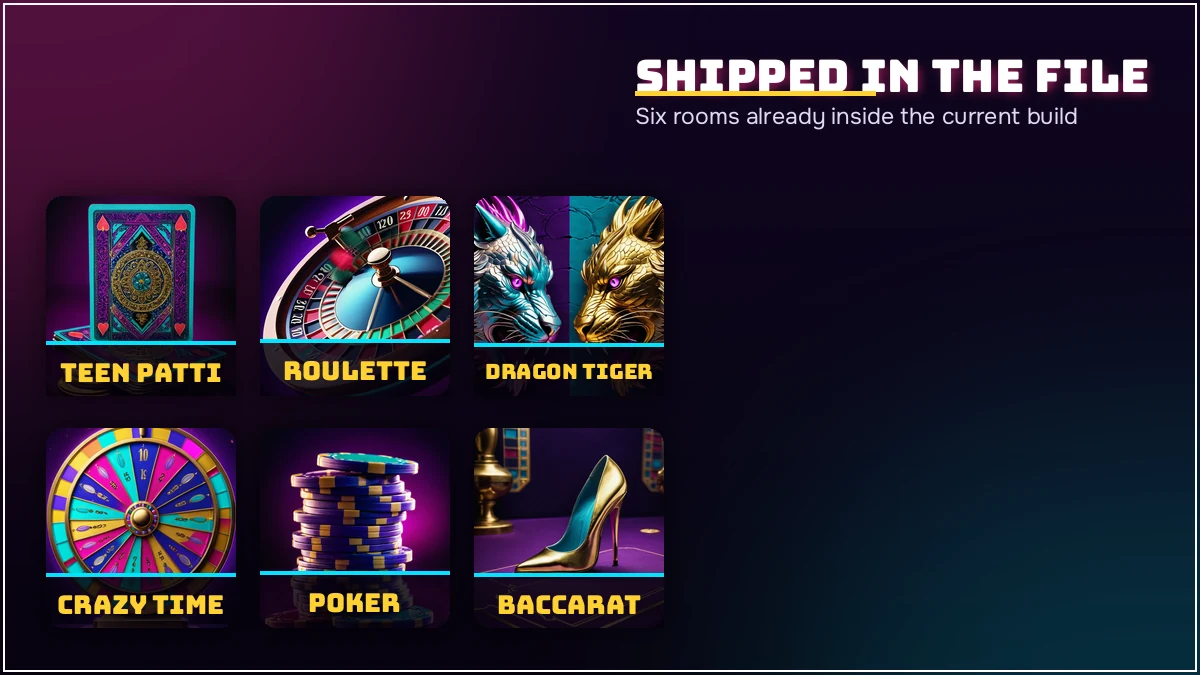
The casino side of the PlayinMatch99 build runs Evolution and Ezugi studios — Teen Patti, Andar Bahar, Dragon Tiger, Lightning Roulette, Baccarat, Blackjack, Sic Bo, Crazy Time, Lightning Dice and 32 Cards among them, with around 50 titles per category. Crash and instant games sit in their own row: Aviator with a round about every 30 seconds, manual and auto cash-out, a double bet and a public round history, plus JetX, Mines and Plinko. Slots come from Pragmatic Play, JILI, Spribe and PG Soft, and stakes start near ₹5 a spin.
Payment screens read identically on the installed build and in the browser: UPI, IMPS or bank transfer, ₹100 as the floor on a top-up, ₹500 as the floor on a withdrawal request, 20 to 60 minutes as the usual wait for the money to land. Big IPL nights stretch that. So does anything after the midnight bank cut-off. PlayinMatch99 asks for one-time KYC before a large payout rather than at signup, which is the order most people prefer.
PlayinMatch APK Permissions — a Clear List of What the File Asks For
Short list, and the shortness is the point. The PlayinMatch99 build asks for install unknown apps once, at install time only. It asks for notifications, which you can decline and still use everything. It asks for storage access when you save a statement or a screenshot of a settled bet.
That is the lot. No contacts, no call log, no SMS, no location, no camera, no gallery scan. If a package calling itself the PlayinMatch apk asks for contact access or SMS reading during install, close it — the real build has no use for either, and the desk can confirm what the current file requests if you ask in chat.
Notifications are the one worth switching back on later. Allowed, they let PlayinMatch99 ping you when a withdrawal is approved or when a market you had open suspends mid-over. Declined, the PlayinMatch99 app behaves exactly the same and you check by hand instead. Android keeps the full list under app info, so you can audit what the PlayinMatch99 build is holding whenever you feel like it.
Checking Your PlayinMatch APK Is the Genuine Build Before You Sign In
Three checks, thirty seconds, done before you type a password into anything.
- The size — 27 to 29 MB. Long-press the file in Downloads and the number is right there. Anything far off that range is not the PlayinMatch99 package.
- The build label — open the installed app, go to the account screen, and the version reads 2026.09 on the current file. A build label that does not appear at all is a warning in itself.
- The source — take the file link from the PlayinMatch99 desk or from this site, never from a forwarded group message. Forwards are where repacked files travel.
One more habit worth keeping: the login console inside the app looks identical to the one at the top of this page — username, password, the Keep me signed in row, the Reset tab. If an installed build shows you a seperate screen asking for a UPI PIN, a bank OTP or a card number before login, it is not the PlayinMatch99 app. The exchange never asks for a UPI PIN at sign-in, and the desk will say the same thing if you check with it first.
Most people never meet a bad file at all. The ones who do almost always got it from a group forward at 1 am. Ten seconds on the size check would have saved them.
PlayinMatch APK — Real Questions the 24x7 Desk Answers
Is the PlayinMatch apk safe to install on Android?
Yes, as long as the file comes from the PlayinMatch99 desk link and weighs about 28 MB. Android warns you once because the package is sideloaded instead of fetched from a store, which is normal for exchange apps. Allow the install for that one app, then check the build label inside the app.
What is the file size of the PlayinMatch apk?
Two numbers matter here: 28 MB to download, and about 150 MB of free space before Android will accept the install at all. The installed PlayinMatch99 app settles near 70 MB once the lobby has loaded once, and the gap between those figures is the unpacked copy Android writes on the way in.
Can I keep using a PlayinMatch app download apk old version?
An older PlayinMatch apk will usually still open and log in, but market screens and cash-out buttons drift out of step with the live server. When the desk adds a studio or changes a deposit method, the old build keeps showing the old screen. Installing the newer file over it takes about 40 seconds.
Why does my phone say the PlayinMatch apk install is blocked?
Android blocks it until the app holding the file is allowed to install unknown apps. Open Settings, find that browser or file manager, and switch the permission on for it. If the message reads App not installed instead, an older PlayinMatch build is still on the phone and has to be removed first.
Will updating the PlayinMatch apk log me out of my ID?
Updating does not touch the ID itself. Your PlayinMatch99 username, balance and open bets sit on the server rather than inside the file, so a new build opens with everything intact. You may have to type the password once after the update if the signed-in session was cleared.
PlayinMatch APK and Every Official PlayinMatch99 Search Around It
Build 2026.09 is the file described above, and playinmatch apk is simply its shortest name. The size settles most of the rest: 28 MB is what a playinmatch apk download weighs, what a playinmatch download apk weighs, and what playinmatch install and playinmatch app download apk latest version are both asking for. Where a playinmatch app download apk old version query turns up, the phone is usually short of storage rather than short of an archive.
- playinmatch live apk and playinmatch live app — the same package, named after the live rooms it opens.
- playinmatch com mobile download, playinmatch com mobile and playinmatch com mobile login — the browser route on a phone, where no file is needed at all.
- playinmatch99 com, playinmatch 99 and playinmatch 365 login — address-style searches that all lead to the same exchange.
What the installed PlayinMatch99 build opens
Inside, playinmatch online and playinmatch online live sports cover the cricket side, while playinmatch live score today, playinmatch live score and playinmatch result queries land on the in-play scorecard sitting beside the market. playinmatch exchange is that sessions and match-odds view.
- playinmatch game, playinmatch casino and playinmatch com casino — the Evolution and Ezugi table rooms.
- playinmatch com slots and playinmatch com slots login — Pragmatic Play, JILI, Spribe and PG Soft, from about ₹5 a spin.
- playinmatch aviator, playinmatch aviator predictor and playinmatch crazy time — crash rounds and the live studio show; the round history is public and no predictor is sold or endorsed.
Ranked by how often they get typed after an install: playinmatch withdrawal time leads, then playinmatch withdrawal, then playinmatch withdrawal time in india, and playinmatch withdrawal problem today spikes only after midnight when the banking window closes. Trust queries follow — is playinmatch safe, playinmatch review, playinmatch telegram. Contact queries close the list: playinmatch whatsapp number, playinmatch customer care number, playinmatch customer care number 24 7, playinmatch customer care number india 24/7 and playinmatch 247, which is also where a join playinmatch request for a first ID is handled.
Real PlayinMatch APK Searches That Land on This Page
- PlayinMatch App Download — the 40-second install walkthroughLink to first screen, step by step, with the seconds each PlayinMatch99 step takes.
- PlayinMatch Live App — in-play cricket on the installed buildHow the installed PlayinMatch99 build handles sessions, prices and the scorecard mid-over.
- PlayinMatch Game — every room the app opensExchange, live studios, crash rounds and the slots shelf on one PlayinMatch99 ID.